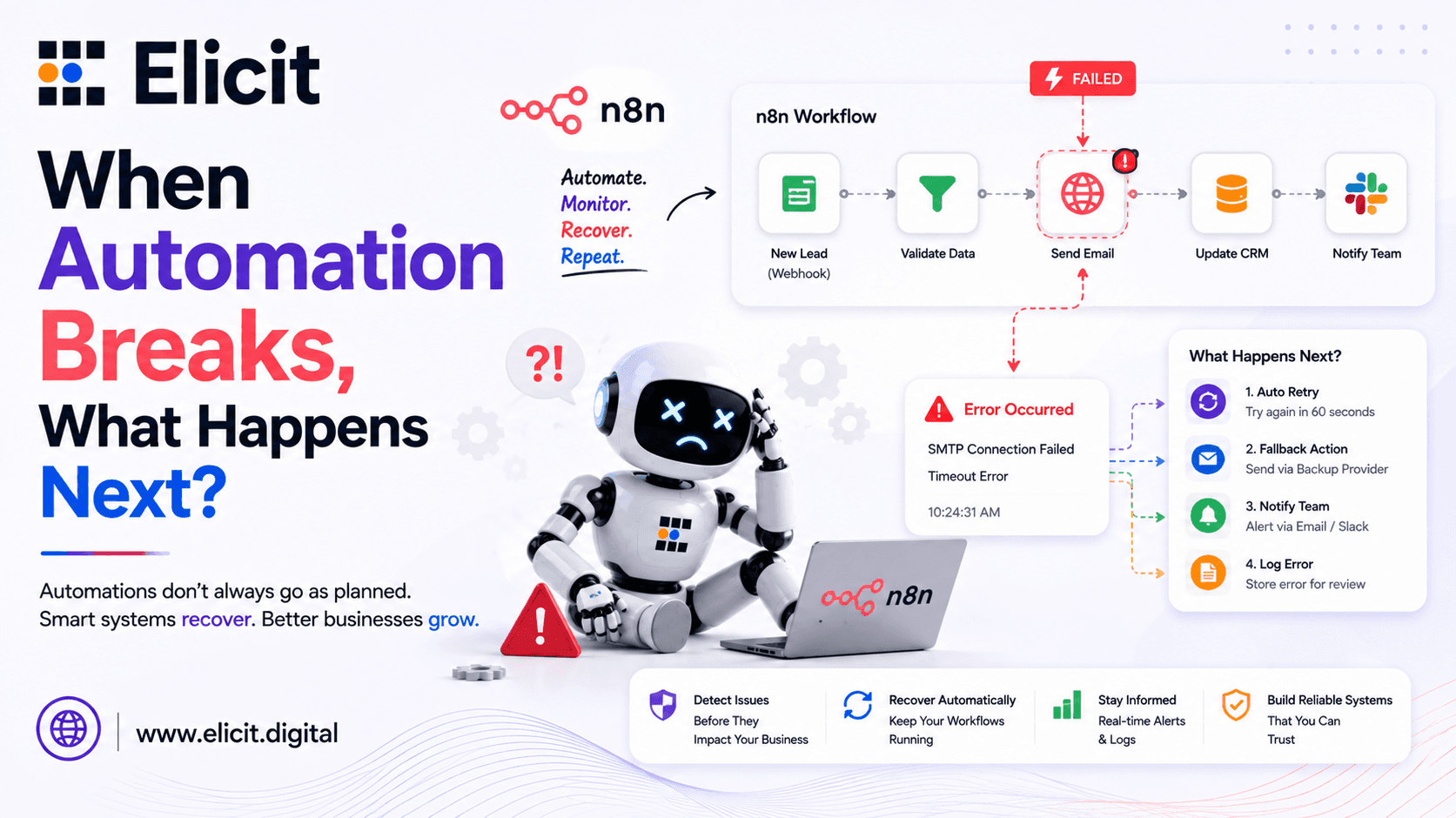
What If Your n8n Workflow Fails Silently
|
Key Takeaways • n8n handles failure at two levels: the node (Retry On Fail, Continue On Fail) and the whole workflow (the Error Trigger). A bulletproof setup needs both. • Fixed-interval retries can overload rate-limited APIs; exponential backoff, doubling the wait time with each attempt, is the more reliable retry pattern for n8n workflow automation. • A dedicated error-handling workflow, wired in via Settings → Error Workflow, gives you one place to log failures, alert your team, and re-trigger the original execution automatically. • Idempotency checks, batching, and fallback branches turn an advanced n8n workflow from something that merely runs into something that survives real API chaos. • As teams add a Custom AI Agent or Calling AI Agent to their stack, error handling stops being optional; one unhandled failure can mean a missed call or a broken CRM record. |
If you have run n8n in production for more than a few weeks, you already know the moment: a workflow that worked perfectly in testing suddenly goes quiet. No alert, no retry, no explanation, just a red execution log entry nobody notices until a customer complains. Every automation platform runs into the same reality: APIs time out, tokens expire, rate limits kick in, and third-party services have outages on their own schedule, not yours. What separates a fragile workflow from a bulletproof one is not the absence of failure. It is what happens the moment failure occurs.
The teams that handle this well don't necessarily see fewer failures than everyone else. They've just made sure no single failure can take down a run silently.
This guide walks through how n8n's error-handling primitives actually work, why fixed-interval retries quietly cause more damage than they prevent, and the patterns experienced automation teams use to keep n8n workflow automation running even when the outside world misbehaves.
Why n8n Workflows Fail Silently by Default
Out of the box, n8n does not notify anyone when something breaks. The execution log records the failure, but unless someone is actively watching the executions tab, it sits there unread. For a webhook-triggered workflow, that's worse than an inconvenience. The incoming data is often gone once the execution halts, especially if nothing was written to storage before the failing step.
In a ten-node workflow, there are effectively ten points where the chain can break: an expired token, a malformed field, a dropped database connection, a vendor API returning a 500 mid-deploy. Left unmanaged, any one of those stops the entire run and leaves partially processed data in an inconsistent state.
This is the gap a proper error-handling architecture closes. It doesn't prevent failures; most causes sit outside your infrastructure — but it makes sure every failure is caught, logged, and either resolved automatically or escalated to a human.
Building that layer once, at the workflow-architecture level, is far cheaper than debugging the same class of silent failure over and over in production.
The Error Trigger: n8n's Workflow-Level Safety Net
n8n doesn't have a native try/catch node the way a general-purpose language would. Instead, workflow-level error handling is built around a dedicated Error Trigger node, paired with a setting most teams overlook: the Error Workflow field under a workflow's settings.
The pattern works like this: build a standalone workflow whose only job is reacting to failures: it's never triggered by a schedule or its own webhook. Its first node is an Error Trigger. Open every production workflow, go to its settings, and point the Error Workflow field at this handler. From then on, any unhandled failure in a linked workflow triggers it automatically, passing along the workflow name, the node that failed, the error message, and a link back to the run.
What you do with that data is up to you. Most teams route it to Slack, email, or a paging tool, but since n8n gives full programmatic control through Function nodes, you can also parse the error type and call n8n's own API to re-run the failed execution with its original input.
That self-healing loop is what turns error handling from a passive log entry into an active recovery step: the workflow effectively retries itself without anyone needing to notice the original failure happened.
Node-Level Options: Retry On Fail and Continue On Fail
A second layer sits underneath, operating per node. Most nodes expose a Retry on Fail setting, re-attempting the same operation a set number of times with a wait in between, useful for the transient failures that make up most production errors. A separate Continue on Fail option lets a node's failure pass through without halting the run, the right call when one bad record shouldn't block the other 499 in the same batch.
Used together, the two settings cover most of what a single node needs: Retry on Fail for the failure that resolves itself, Continue on Fail for the one that shouldn't be allowed to stop everything else.
Retry Logic That Actually Works: Exponential Backoff

The built-in Retry On Fail setting is a good starting point, but it uses a fixed wait time between attempts. Against a rate-limited API, that is a problem: if ten workflow executions all retry after the same thirty-second wait, you effectively create a second wave of requests that hits the API at once, sometimes making the rate limit worse rather than better.
Exponential backoff solves this by doubling the wait time after each failed attempt: ten seconds, then twenty, then forty. This spreads retries out naturally and gives a struggling API room to recover. Teams that switch from a fixed interval to exponential backoff on rate-limited integrations typically see a sharp drop in repeat failures on the same record.
Implementing this in n8n usually means a small Function node tracking the attempt number, calculating the next wait duration, and feeding it into a Wait node, alongside an IF node checking whether the maximum attempts have been reached before looping back.
It's a small amount of setup for a pattern that gets reused across nearly every rate-limited integration in a mature n8n stack.
Not Every Error Deserves a Retry
A resilient system also tells retryable errors apart from ones that will never succeed. Timeouts, 429s, and 5xx server errors are generally worth retrying. A 400 or 401 will fail identically every time and should route straight to the alert path instead.
Sorting errors this way up front keeps the retry loop from wasting cycles on failures no amount of waiting will fix.
Patterns for Truly Bulletproof Automation
Once the basics are in place, building a genuinely advanced n8n workflow comes down to a handful of patterns builders reach for again and again:
• Idempotency checks: before processing a payment or updating a record, check whether that action already happened, preventing double-charges or duplicate CRM entries when a retry re-runs an already-successful step.
• Batching with progress tracking : Break big jobs into smaller batches and track your progress. A failure halfway through just picks up where it stopped — no need to rerun the whole thing.
• Fallback branches: When your main integration goes down, don't let the whole workflow grind to a halt. Route it somewhere else instead a backup vendor, a retry queue, or a task that lands in front of a real person to handle manually.
• Structural validation: put an IF node in front of anything risky to check the incoming data actually has the fields you're expecting. It's a lot easier to catch a bad payload right away than to figure out why some node three steps later just fell over.
• Hard limits on retries : set a ceiling and stick to it. We've seen retry loops with no cap quietly chew through execution time until the workflow times out anyway.
Error Handling for AI Agents and Voice Automation
As more teams connect n8n to a Custom AI Agent for support or sales, error handling takes on new stakes. A Calling AI Agent that drops mid-conversation because an API timed out doesn't just log an error. It ends a live customer interaction. Same goes for any workflow built around Customer Automation, where a silent failure can mean a lead never gets followed up with.
For AI-driven workflows, add a few extra safeguards: a timeout on every LLM or voice-API call, a fallback response for a failed tool call, and logging of every agent decision for review later. These agents make real-time decisions, so an unhandled error costs a customer a moment, not just a batch job.
That shift in stakes is why teams running AI agents in production tend to treat error handling as a first-class part of the build, not something bolted on after launch.
When It's Time to Bring in an n8n Expert
Most of the patterns above can be built by any team comfortable inside the n8n editor. Things get harder at scale: dozens of interconnected workflows, AI agents making live calls, integrations across a dozen vendors, each with its own failure behavior. That's usually when teams bring in an n8n expert to audit the setup, standardize error handling, and build a monitoring layer that catches problems before customers do.
That audit alone often surfaces failure points a team didn't know existed, since silent failures by definition don't show up until someone goes looking for them.
If your workflows are growing faster than your ability to keep them resilient, talk to a team that builds this for a living. You can get n8n Expert Service to have your automations audited for silent failure points, or a new n8n automation built with retry logic, alerting, and fallback handling from the start.
Frequently Asked Questions
Does n8n have a built-in try/catch node?
Not in the traditional sense. n8n splits error handling into node-level settings (Retry On Fail, Continue On Fail) and a workflow-level Error Trigger that catches unhandled failures via the Error Workflow setting.
What's the difference between error handling and retry logic?
People tend to use these two interchangeably, but they're not really the same thing. Error handling is the whole system — catching a failure, logging what happened, and deciding what to do next, all without taking the workflow down. Retry logic is just one piece of that: automatically trying a failed step again, ideally waiting a bit longer each time instead of using the same fixed gap.
How many times should a node retry before giving up?
Honestly, there's no magic number here. Three to five attempts with exponential backoff works fine for most of the APIs we deal with. Past that, you're probably not looking at a temporary blip anymore. It's a real outage, and retrying isn't going to fix that.
Can n8n automatically re-run a failed workflow?
Yes. Using n8n's own API from an error-handling workflow, you can re-trigger the original failed execution with its original input, and only escalate once retries run out.
Beyond Automation: A Full-Stack Technology Partner
Reliable n8n workflows are usually one piece of a larger stack. Teams that come to us for automation often need a mobile app development company too, to carry that same experience onto a phone. We also work as an app development software partner covering mobile app development services and custom builds, and we're among the established mobile app development companies in Indore, handling app development in Indore for founders who want it built by one team.
The same principle carries over from workflow design: a system that's resilient by default, rather than patched after something breaks, tends to cost less to maintain over time.
|
Ready for Workflows That Don't Break Silently? From retry logic and error alerts to full-scale customer automation and AI agents — we build n8n workflows that hold up in production, not just in a demo. |